Transaction Process Flow
This section outlines the detailed steps involved in processing transactions through Payloft Aggregators.
Flow of Transactions for Payloft Aggregators
Transaction Flow Diagram
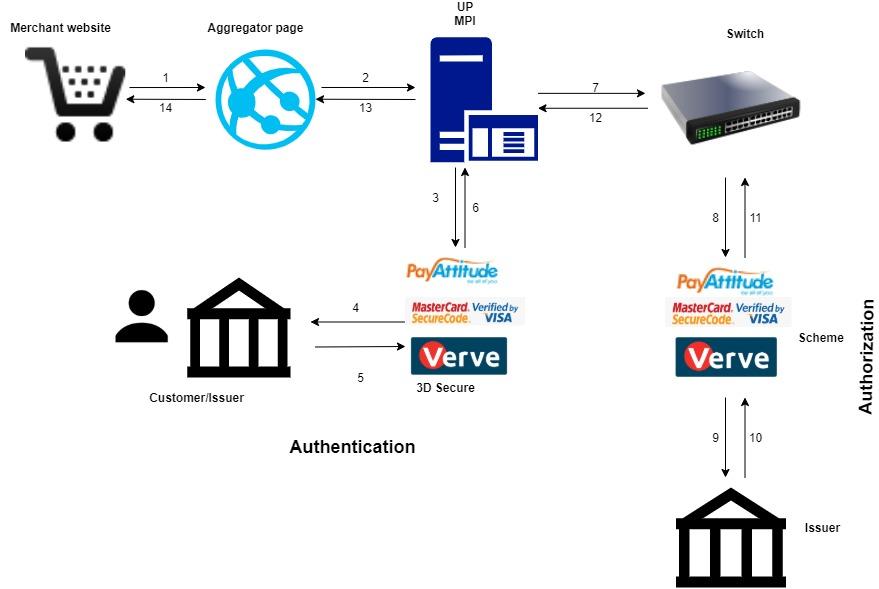
Step-by-Step Transaction Flow
Customer Checkout
The customer selects items on the WebShop and proceeds to checkout.
Payment details are entered and submitted for processing.
Aggregator Captures and Forwards Data
The aggregator collects the payment details and securely forwards them to UP MPI.
If card data is involved, it must be encrypted before transmission.
UP MPI Initiates Authentication
UP MPI sends an authentication request to the 3D Secure Provider to verify the cardholder’s identity.
3D Secure Provider Contacts Issuer
The 3D Secure Provider communicates with the card issuer to initiate authentication.
Issuer or Cardholder Completes Authentication
The issuer may prompt the cardholder for verification (e.g., OTP, biometrics, or password).
The authentication result is returned to the 3D Secure Provider.
Authentication Response Sent to UP MPI
The 3D Secure Provider relays the authentication outcome back to UP MPI.
UP MPI Sends Authorization Request to UP Switch
Upon successful authentication, UP MPI initiates an authorization request to the UP Switch.
UP Switch Forwards Request to Payment Scheme
The UP Switch sends the request to the appropriate payment scheme (Visa, Mastercard, Amex, Verve, or PayAttitude).
Payment Scheme Contacts Card Issuer
The scheme forwards the authorization request to the card issuer for final approval.
Card Issuer Approves or Declines Transaction
The issuer evaluates the request and either approves or declines the transaction.
The decision is routed back through the payment scheme.
Scheme Returns Authorization Response
The scheme sends the response to the UP Switch.
UP Switch Sends Response to UP MPI
The UP Switch returns the authorization result to UP MPI.
UP MPI Sends Confirmation to Aggregator
UP MPI notifies the aggregator of the transaction outcome.
Aggregator Notifies WebShop
The aggregator sends a payment confirmation (or failure notice) to the WebShop.
WebShop Displays Payment Status to Customer
The WebShop updates the customer with the transaction status: approved, declined, or failed.
All transaction details are logged for record-keeping and reconciliation.
This process ensures that all transactions are securely authenticated, properly authorized, and seamlessly completed, providing a smooth and reliable payment experience for customers.